
You have no items in your shopping cart.
Multi-Output LED Power Supplies: Total Watts vs Per-Output Limits
Thursday, October 15, 2026
Click here to download PDF
In this guide
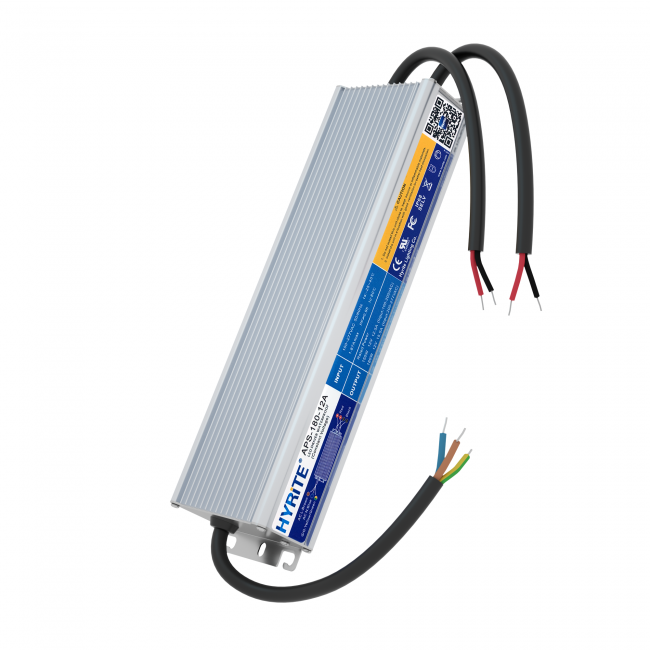
A 180W power supply can look suitable for a sign with a 150W LED load. With a multi-output version, however, the total wattage is only the first check. The load connected to each output must also fit that output’s documented rating. A suitable total does not automatically make every proposed branch arrangement suitable.
For signage buyers, the useful question is therefore more specific than “How many watts do I need?” Ask which version is being supplied, how its outputs are rated, and how the proposed LED groups will be connected. This guide explains that distinction with a HYRiTE APS-A example and a simple branch worksheet.
1. Identify the version before comparing ratings
The HYRiTE APS-A 180W product page lists standard 12V and 24V models. It also identifies an optional 12V Class 2 version with three outputs, each rated 5A and 60W, giving 180W total. These descriptions serve different purposes: one describes the overall model rating, while the other specifies the optional output arrangement.
Use the exact quotation, product label and matching documentation to identify the version being ordered. Do not assume that every unit carrying the same family name has identical output wiring. Likewise, the three-output 12V information does not establish the ratings or availability of a 24V option.
The arithmetic for the confirmed 12V option is straightforward: 12V × 5A = 60W per output, and three outputs × 60W = 180W total. These figures describe rated capacities. They are not a recommendation to operate every installation continuously at its maximum rating.
2. Check the total and each output separately
Consider two hypothetical load arrangements for that three-output version. These are calculation examples, not tested installation designs.
| Arrangement | Output 1 | Output 2 | Output 3 | Total | Rating check |
|---|---|---|---|---|---|
| A | 50W | 50W | 50W | 150W | Below each 60W output rating; further installation checks required |
| B | 70W | 40W | 40W | 150W | Output 1 exceeds its 60W rating despite the same total |
At nominal 12V, the 70W branch represents approximately 5.83A, which exceeds the documented 5A output rating. Unused capacity on the other outputs does not provide permission to overload that branch.
Arrangement A passes only this initial arithmetic check. Available output still depends on the applicable operating conditions and manufacturer instructions. Wiring, voltage at the LEDs, temperature and the exact LED load all remain part of the selection.
3. Build a branch worksheet from the actual LED load
Record each output separately rather than entering only a project total. For every branch, include the LED model, nominal voltage, quantity, documented power or current, and calculated branch load. Use the correct specification for the LED variant; appearance and module count alone do not establish consumption.
For an initial calculation, multiply the specified power per module by the number of modules on that output. Then compare that result with the output’s documented capacity. Keep the project assumptions visible, including whether the module figure is nominal, maximum or measured under specified conditions.
Also record cable length, conductor size and the proposed connection layout. These details help the supplier assess the proposal. A branch that fits the wattage rating can still require attention to voltage drop or wiring limits. Do not copy a maximum module-chain length from a different module or assume that one long chain is equivalent to several separately connected groups.
4. Apply operating limits before final selection
The APS-A documentation includes input-voltage and ambient-temperature loading limits. Check the matching version’s current documentation against the site’s AC supply and installation environment. A nameplate rating should not be treated as guaranteed usable output at every input voltage and temperature.
Where derating applies, obtain confirmation of both the allowable total load and any relevant per-output restrictions. Do not invent a rule for distributing a reduced total across outputs. Similarly, a general loading-margin recommendation cannot replace the product’s specified operating limits.
The number of visible cable pairs does not by itself establish electrical isolation, output topology or permission to connect outputs together. Follow the documented wiring arrangement and obtain manufacturer approval for any proposed parallel connection. Class 2 suitability also requires the documentation for the supplied version and the applicable installation requirements; wattage arithmetic alone does not establish compliance.
5. Make the quotation unambiguous
Send the supplier the exact required version, output voltage, branch worksheet, AC input, operating conditions and destination market. Ask for the matching wiring diagram and supporting documentation. If you require the optional three-output 12V version, state that explicitly instead of ordering only “APS-A 180W.”
Start with the APS-A 180W product page, then use our signage power supply enquiry checklist to assemble the remaining project details. For the distinction between supply types, see the CV and CC guide. You can also browse outdoor power supplies, explore all products, or contact HYRiTE for a version-specific review.
Before ordering: Confirm the exact output version and matching documentation with HYRiTE. The example load arrangements are calculations, not tested installation designs.
← Back to Blog
<< back